

Use a three-phase communication plan, pre-event, during-event, and post-event, backed by published service level agreements and at least two redundant alert channels. Your first three moves: publish a pre-season notice setting expectations, confirm your contractor’s contact person and update schedule, and spell out parking and sidewalk rules before the first flake falls. Done right, this cuts complaint calls, keeps walkways safer, and gets plows moving faster because nobody is guessing.
TL;DR:
- Sending coordinated updates on progress, priorities, and safety actions every two to six hours during storms maintains transparency and reduces resident calls.
- Having clearly assigned message owners and escalation contacts ensures consistent communication and prevents delays or failures mid-storm.
- Using multiple channels like text, email, signage, and social media guarantees urgent messages reach all residents promptly, with messages pointing to a centralized information hub.
- Sharing timestamped work reports and real-time progress data builds trust and avoids the need for live tracking software at a fraction of the cost.
- Establishing specific trigger points and SLAs, such as clearance within hours after two inches of snow, makes expectations precise and actionable for contractors and residents alike.
Table of Contents
- Building Your Pre-Event, During-Event, and Post-Event Communication Plan
- Which Communication Channels Should You Use, and How Many?
- Who Owns Each Message, and Who Do They Escalate To?
- Copy-Ready Templates and When to Send Them
- What Progress Data Should You Share During the Storm?
- Closing the Loop After the Storm
- Setting SLAs and Trigger Points Residents Can Actually Understand
- How a Reliable Vendor Makes This Plan Actually Work
- A Property Manager’s Take on What Actually Breaks Communication Plans
- Let Denversnowremovals Handle the Operations Behind Your Communication Plan
- Where to Find Ready-Made Templates and Policy Language
- Sources
- FAQ
Building Your Pre-Event, During-Event, and Post-Event Communication Plan
A snow removal communication plan only works when it treats the winter season as three distinct communication jobs, not one. Each phase has its own goal, its own audience temperature, and its own failure mode if you skip it.
Pre-event (before the first storm):
- Publish a season-opening notice covering parking rules, sidewalk responsibilities, and what “cleared” actually means on your property.
- Confirm your contractor agreement in writing, including who to call and how fast they respond.
- Compile a standing FAQ that answers the questions you get every single year.
- Open sign-ups for text or email alerts so residents opt in before they need the information.
- Update every contact list, tenant roster, board email chain, before the season starts, not after the first storm exposes the gaps.
During-event (while snow is falling):
Send updates on a fixed cadence rather than sporadically. Every message should include four things: current status, which areas are affected, an estimated completion window, and one clear safety action (“move cars from Lot B by 6 a.m.”). Skipping any of these forces residents to call and ask, which defeats the purpose of sending anything at all.
Post-event (after the storm clears):
Send a completion notice, thank the crews by name if possible, and summarize what was done and when. Include clear instructions for anyone with an exception, a blocked driveway, a missed area, a damage claim, so those issues don’t become angry phone calls. The CTI T2 Center’s winter communication framework treats these three phases as the backbone of any credible plan, and for good reason: skipping one always shows up as extra calls in the next one.
Which Communication Channels Should You Use, and How Many?
No single channel reaches everyone, which is exactly why redundancy isn’t optional for urgent messages. Some residents live by text, others never open email, and a portion still rely on a printed notice taped to a mailbox bank. Layer channels by how fast they move and how long they last.
- Text/SMS: fastest delivery, best for urgent parking or safety alerts, but limited to short messages.
- Email: slower than text, better for detailed updates, FAQs, and links to a full status page.
- Resident portal or website: not fast, but persistent, this is where people check when they missed the alert.
- Phone tree: slow and labor intensive, reserve it for board members, vendors, or residents without digital access.
- Physical signage: essential for parking enforcement and sidewalk closures, since not everyone checks a phone before walking outside.
- Social media: good for reach and reassurance messaging, weak for anything time sensitive.
The rule of thumb: any urgent message goes out on at least two channels simultaneously, and every message should point back to one central web page or portal for full details. When picking a notification tool, prioritize scheduled sends, delivery confirmation, and the ability to segment messages by building or lot, features that separate a real communication tool from a plain group text.
Who Owns Each Message, and Who Do They Escalate To?
Confusion about who is allowed to send updates is one of the fastest ways a communication plan collapses mid storm. Assign roles before the season starts, not while the phone is ringing.
- Primary message owner: one named person, property manager or board communications chair, who drafts and approves outgoing updates, with a backup named in advance.
- Contractor liaison: the person who receives timestamped photos and route checklists from the snow contractor and translates that into resident-facing language. Requiring evidence of work from contractors keeps your public updates honest instead of guessed.
- Escalation contacts: a documented chain for blocked access, medical emergencies, or enforcement disputes, including after-hours numbers. If you haven’t already, review what to ask a snow contractor before signing so these expectations are contractual, not verbal.
Copy-Ready Templates and When to Send Them
Templates remove hesitation. Adapt these instead of drafting from scratch during a storm.
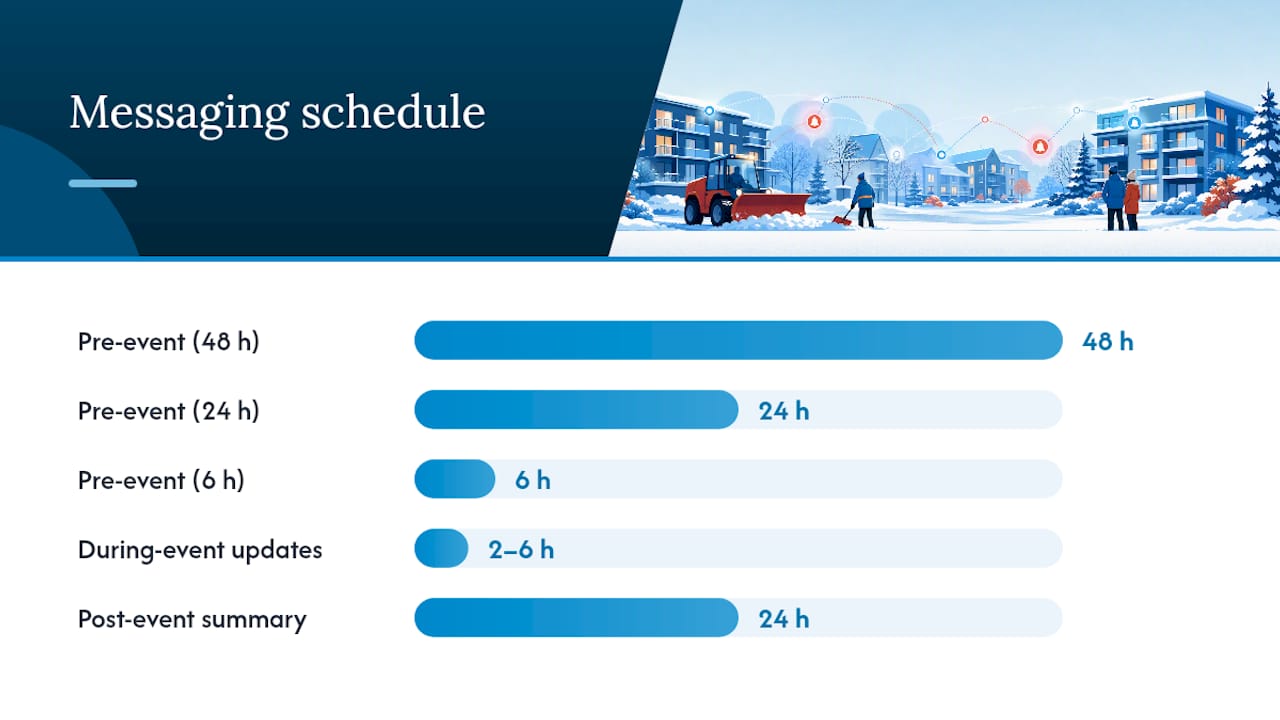
- Pre-event notice (48 hours out): “Winter Storm Alert: Snow is forecast to begin [day/time]. Please move vehicles from Lot [X] by [time] so crews can clear the full surface. Sidewalks remain resident responsibility per our winter policy.”
- 24-hour reminder: “Reminder: Snow removal begins tomorrow at [time]. Vehicles left in marked zones may be temporarily relocated to allow full clearing.”
- 6-hour final call: “Final reminder: Plowing starts at [time] today. Please clear Lot [X] now to avoid delays.”
- During-event update: “Status update, [time]: Main roads and Building [A/B] cleared. Lot [C] in progress, ETA [time]. Please use caution on untreated walkways.”
- Completion notice: “All lots and walkways have been cleared as of [time]. Thank you to our crews for working through the night. Report any missed areas to [contact].”
Send pre-event reminders at 48 hours, 24 hours, and 6 hours before the storm’s expected start. During the event, update every two to six hours depending on storm severity, more frequent for a major dump, less for light accumulation. Post an event summary within 24 hours of completion.
Pro Tip: Keep a large-print or translated version of your core templates on file for senior residents and non-English speakers, and add a separate, slightly more formal version for commercial tenants who need firm ETAs for loading docks and deliveries.
What Progress Data Should You Share During the Storm?
Residents don’t need a live map, they need honest, timestamped proof that work is happening. Share what you actually have.
- Which routes or lots are complete, in progress, or not yet started.
- Which areas were prioritized first (main entrances, fire lanes, ADA routes) and why.
- Crew hours logged and any equipment downtime affecting the schedule.
- A realistic completion window, framed as a goal that shifts with storm intensity.
Municipalities that maintain official channels during storms see measurably higher resident goodwill when they share concrete progress metrics and thank crews publicly, a pattern that translates directly to a single property or HOA campus. You don’t need live plow-tracking software to get this benefit. Timestamped status updates, a posted route map, and a short “your building is next” message accomplish nearly the same thing at a fraction of the cost.
Closing the Loop After the Storm
A post-event report doesn’t need to be long, but it needs to exist every single time. Include areas fully served, any unresolved spots, total resource usage (crew hours, salt or de-icer volume), and a short list of follow-ups for next time.
- Collect resident feedback within 48 hours through a short form or portal comment box, not an open-ended email thread.
- Log recurring complaints (same lot, same corner) so they’re not rediscovered from scratch next storm.
- Feed what you learned into next season’s FAQ, SLA language, and contractor agreement before you forget the details.
Setting SLAs and Trigger Points Residents Can Actually Understand
Publish specific triggers instead of vague promises. A workable example: two inches of accumulation triggers deployment to primary routes, with an initial clearing goal within a defined number of hours after snowfall stops.
- Define priority tiers: emergency access and main entrances first, secondary lots and walkways next, low-traffic areas last.
- Word SLAs as goals, not guarantees, and name the exceptions plainly: back-to-back storms, extreme cold that slows de-icer performance, or equipment failure.
- Require contractor reporting, timestamps and route checklists, written into the contract so those numbers can feed directly into your public updates rather than getting summarized secondhand.
How a Reliable Vendor Makes This Plan Actually Work
A communication plan is only as good as the operational data behind it. A reliable snow removal team with equipment ready for varying storms is crucial because your SLA windows and progress updates are only credible if the crew behind them can actually hit the trigger points you publish.
When evaluating any snow removal partner for your property, require named contacts, a defined update cadence, and evidence of completed work, photos or checklists tied to a timestamp. Those contract terms are what let a manager turn contractor activity into resident-facing updates without guessing.
A Property Manager’s Take on What Actually Breaks Communication Plans
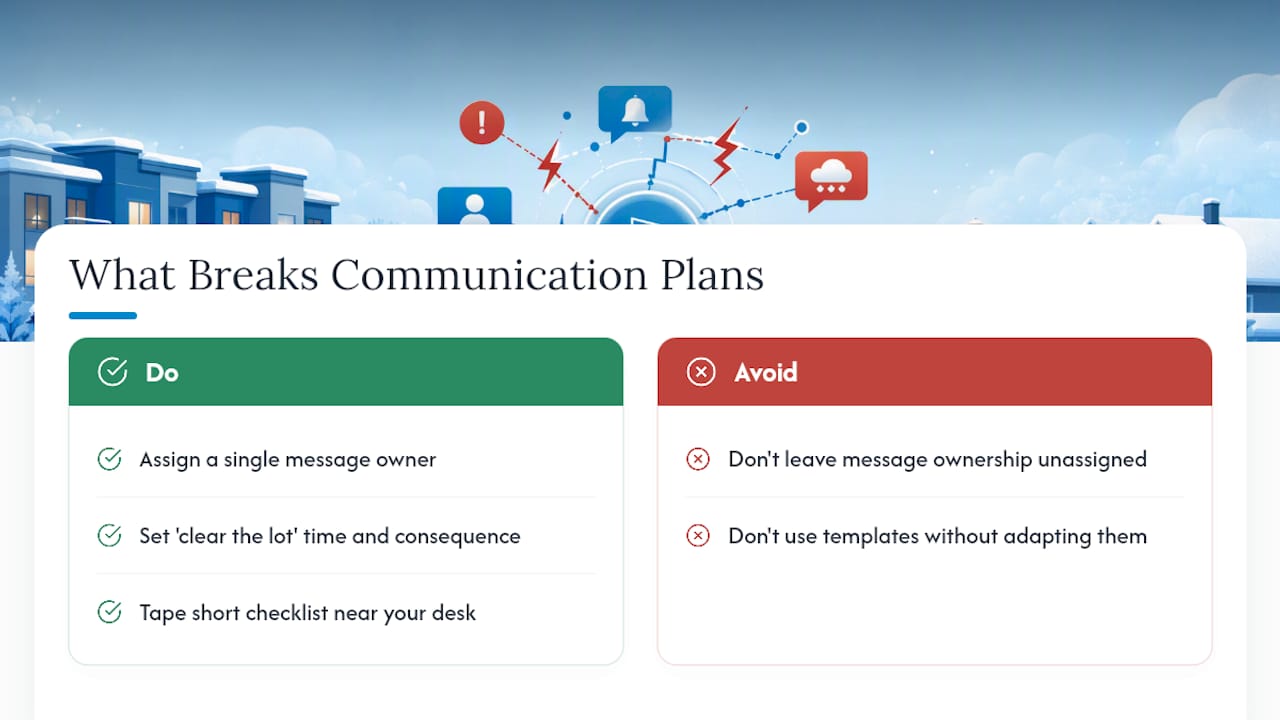
The plans that fail aren’t missing templates, they’re missing ownership. Late updates happen because nobody was assigned to send them. Parking complaints spike because “clear the lot” was never defined with a time and a consequence. And most breakdowns trace back to having no single message owner, so three people assume someone else already sent the update.
Keep a short checklist taped near your desk: pre-season notice sent, contractor contact confirmed, alert sign-ups open, during-storm cadence set, post-event summary drafted. Adapt every template here to your property’s actual ordinances and resident mix before you rely on it.
— Jesse
Let Denversnowremovals Handle the Operations Behind Your Communication Plan
A communication plan is only as strong as the crew executing behind it. A professional snow removal service provides property managers and HOA boards with a 24/7 team and dedicated equipment that can hit the accumulation triggers and response windows you publish to residents, so your SLA language isn’t just a hope.
When you request a quote, ask three specific questions: what response time you can expect after a trigger threshold is hit, what reporting (timestamps, route checklists) you’ll receive to feed into resident updates, and whether a seasonal contract fits your property better than per-storm calls. Some snow removal companies offer free estimates and flexible plans built around operational transparency, whether you manage a commercial lot, an HOA campus, or a single-family driveway. Get a free snow plowing estimate for your Denver property and lock in contractor terms before the season’s first real storm.
Where to Find Ready-Made Templates and Policy Language
Beyond your own drafts, a few sources are worth keeping bookmarked when you’re writing policy copy or filling out an FAQ.
- The CTI T2 Center’s winter communication brief lays out the phased structure and FAQ approach this plan is built on.
- Ready includes sample messages for businesses covering safety and outage guidance.
- The City of Cincinnati’s snow and ice control plan shows how a larger operation structures dispatch and reporting, useful for shaping your own contractor requirements.
- For pre-event resident prep, door and entryway winterization guidance pairs well with your seasonal notice.
Sources
- An Important Tool: A Personalized Winter Communication Plan (CTI T2 Center)
- Communications Best Practices in Snow Storms (Zencity)
- Ready
- City of Cincinnati Snow and Ice Control Plan
FAQ
What Should a Good Snow Removal Communication Plan Include?
It should cover pre-event, during-event, and post-event messaging, published SLAs with clear triggers, at least two redundant alert channels, a defined message owner, and a standing FAQ that answers the questions residents ask every season.
How Do Property Managers Get Reliable Snow Removal Contractors?
Ask for named contacts, a documented response window tied to accumulation triggers, and evidence of completed work like timestamped photos, then confirm those terms in a signed seasonal contract rather than a verbal agreement.
What Is the Average Hourly Rate for Snow Removal?
Rates vary widely by region, property size, and equipment needed, so request a free estimate specific to your site rather than relying on a national average that won’t reflect your lot size or storm frequency.
How Often Should Residents Get Updates During a Storm?
Send updates every two to six hours depending on storm severity, more frequent during a heavy or fast-moving system, less frequent for light, steady snowfall.
What Makes Snow Removal Messaging Effective Rather Than Just Frequent?
Effective messages include four elements every time: current status, affected areas, an estimated completion window, and one clear action residents need to take, which is what separates a useful update from noise.